




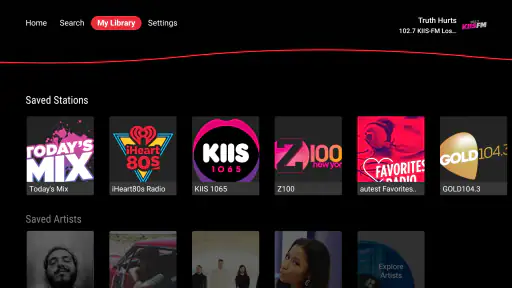
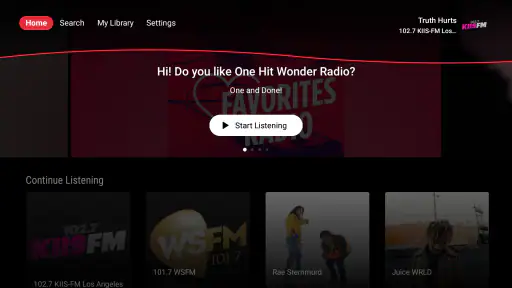
I approached iHeartRadio as a living-room music app rather than a phone service stretched onto a television. On Google TV, that distinction matters. A television is usually shared, the remote is less precise than a touchscreen, and people tend to choose something quickly before settling on the sofa. In that setting, iHeartRadio’s main appeal is its direct route to live audio and spoken listening. It feels most useful when I want familiar radio-style entertainment without building a playlist from scratch.
My overall view is positive but qualified: this is a convenient free option for casual listeners, especially people who enjoy live stations and podcasts, but it is not the best fit for someone who expects the deep personal control of a dedicated on-demand music subscription. The experience depends heavily on whether its available stations and shows match your habits. When they do, the app is pleasantly effortless. When they do not, the large-screen format makes the limitations more noticeable.
How the Google TV experience feels in everyday use
The first thing I noticed is that the app makes more sense as background entertainment than as a tool for carefully managing a personal music library. I can imagine opening it while cooking, hosting friends, starting a workout, or filling a quiet room during work. Instead of spending several minutes choosing individual tracks, I can select a live source or a podcast and let the audio carry on.
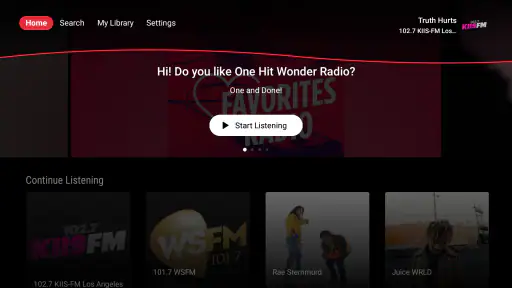
That simplicity is the strongest argument for installing it on Google TV. A television already has a natural place in the home, and the app turns the screen into a convenient audio hub even when nobody is watching video. The interface does not need to compete with a phone full of notifications or a desktop crowded with tabs. I can leave the television on, put the remote down, and treat the service more like a familiar radio than a complicated media dashboard.
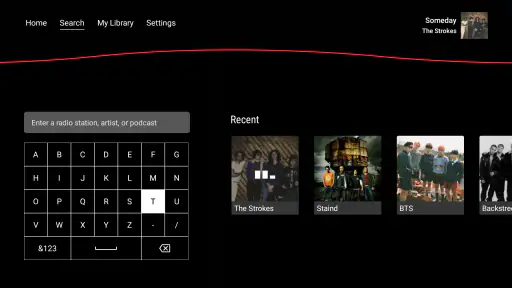
At the same time, Google TV is not automatically the perfect platform for every listening style. If I am searching for a very specific artist, album, or recording, entering text with a remote can feel slower than reaching for a phone. That trade-off is important. The app works best when I already know the kind of listening session I want, not when I am in the mood to explore a huge catalog one item at a time.
Live listening is the clearest strength
The live-radio side gives the service its personality. Traditional radio remains good at removing decision fatigue: I choose a station, hear a sequence selected for that format, and accept a little surprise along the way. On a television, that behavior feels natural because I am usually looking for something to accompany another activity rather than demanding complete control over every song.
I also like the social quality of live audio. A carefully assembled personal playlist can be excellent, but it can feel private and repetitive. A live station gives me the sense that I am joining an ongoing broadcast. That makes it a good choice for a family room, where different people may have to agree quickly instead of taking turns managing a queue.
There is a practical tip here: I would set up the app before guests arrive or before starting a busy task. Browsing with a television remote is manageable, but it is not something I want to do repeatedly while carrying groceries or preparing dinner. Choosing a suitable station in advance turns the app into a one-button background option, which is where it feels most polished.
Podcasts make the app more useful beyond music
The podcast side broadens the service considerably. If I only wanted music, I would compare it directly with music-first platforms. Podcasts give me another reason to keep the app installed because the same television can shift from songs to spoken programs without changing devices or inputs.
This is especially useful in a shared room. One person might prefer music during breakfast, while someone else wants a conversation show later in the evening. The app can serve both habits, although the television is still better for choosing a program than for managing a long list of episodes with precision. I would use it for selecting a show and listening comfortably, not for detailed podcast administration.
A useful workflow is to treat Google TV as the playback destination and a phone as the discovery tool when needed. I can find something interesting on a smaller screen, then use the television when I want room-filling sound. That approach avoids forcing the remote to handle every search while preserving the comfort of listening from the sofa. It also highlights the app’s role as part of a broader home setup rather than a replacement for every other device.
What the free model means in practice
The app is free to install, which lowers the risk of trying it. That is a meaningful advantage for households that want radio and podcasts without immediately committing to another recurring service. The presence of optional in-app purchases, listed from around one dollar to about ten dollars per item, means the free experience should be treated as the starting point rather than an assumption that every part of the wider service is identical.
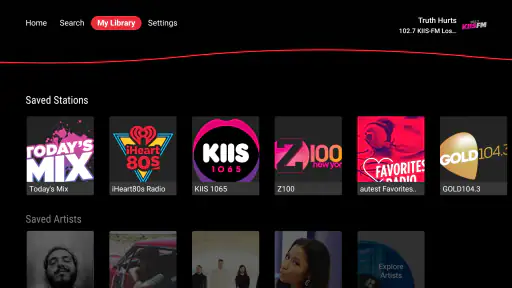
I would not install it expecting the same kind of uninterrupted, fully controlled listening associated with premium music subscriptions. The value proposition is different. Here, the attraction is access and convenience: open the app, choose a source, and listen. For many casual users, that is enough. For listeners who care about ownership-style control, exact sequencing, or a highly personalized library, the free approach may feel less satisfying.
Another practical consideration is that the app is rated for Everyone, making it an approachable choice for a household device. That does not mean every program will suit every listener, so I would still pay attention to what children are selecting, particularly when the television is shared. The age rating describes the app’s general suitability, not a guarantee that every piece of audio matches a family’s preferences.
A closer look at convenience and friction
My favorite aspect is the low-effort transition from silence to sound. I do not need to plan an entire listening session. That is valuable after a long day, when the difference between an app I use and an app I abandon is often how quickly it gets out of the way.
The main friction comes from the same simplicity. Live listening gives me less control than an on-demand catalog, and the remote makes intensive browsing less comfortable. If I want to compare many podcasts, inspect detailed information, or construct a carefully ordered listening queue, I would rather use a phone or a service designed around library management.
There is also a difference between “having audio available” and “having the exact audio I want.” A radio-oriented service can be excellent when I am open to a format, mood, or station. It is less compelling when I have a precise request and do not want alternatives. That is not a small distinction; it should determine whether this becomes my primary app or simply a useful secondary option on Google TV.
Who will get the most from it?
I would recommend it first to people who miss the ease of radio but want a modern television app. It suits listeners who enjoy discovering music through stations, families that need a quick shared audio choice, and podcast fans who prefer listening in the living room. It is also a sensible trial for anyone who wants a no-cost way to add more audio to a Google TV setup.
It works well for occasional listeners because there is no need to maintain a complicated collection. Someone who listens while cleaning, relaxing, cooking, or having friends over can get real value from the service without exploring every corner of it. In my experience, that kind of listener is more likely to appreciate the app than a music enthusiast who spends time organizing albums and fine-tuning playlists.
I would be more hesitant to recommend it as the only audio app for a serious music listener. If your routine depends on selecting exact versions, controlling every transition, or keeping a carefully organized personal library, a dedicated on-demand service will probably be a better match. The same applies if you dislike the unpredictability of live programming. iHeartRadio’s strength is letting the service make some choices for you; that becomes a weakness when you want complete authority over the session.
Compatibility and the practical decision to install
The Android app comes from iHeartMedia, Inc., and its current version is 4.12.0. It supports devices running Android 5.1 or later, so the stated system requirement is relatively approachable for compatible Android hardware. For a Google TV owner, I would still check that the television or streaming device presents the correct version in its app store and that the remote experience feels comfortable before relying on it as the household’s main audio solution.
The service has been available since June 26, 2014, and its reach is reflected in more than a million installs. Its average rating is 3.6 from roughly 335 ratings, with about 51 written reviews. I read that combination as a sign to keep expectations realistic: there is enough interest to make the app worth trying, but the experience is not universally loved. Ratings are especially useful here as a reminder that convenience on one device does not guarantee a perfect fit for every listener.
Because the app is free, my advice is straightforward: install it when your priority is live music, radio-style discovery, or podcasts in the living room. Give it a real test during the moments when you normally want background audio. Do not judge it only by a short browse through the menus; its value appears when the app becomes part of a routine.
My final verdict for Google TV owners
iHeartRadio is at its best when I stop treating it like a giant music catalog and use it for what it does naturally: bringing live audio and podcasts into an easy shared space. Its free entry point, broad household appeal, and low-effort listening make it a useful addition to Google TV. I especially like it for mornings, casual gatherings, and those evenings when I want sound in the room without making another detailed decision.
Its limitations are just as clear. Remote-based discovery is not ideal for deep browsing, live formats cannot offer the same precision as on-demand music, and listeners with demanding library habits may quickly want another service. I would skip it if total control is your main requirement, but I would recommend trying it if you want a simple radio-and-podcast companion for the television.
My bottom line: this is a practical, approachable audio app rather than a complete replacement for every music service. For the right listener, that narrower focus is exactly why it works. Install it for effortless live listening and spoken audio, keep your expectations centered on convenience, and it can earn a regular place on your Google TV home screen.


